Room Reservation Policy
UPDATED 9.15.26
Scheduling of all Theatre Program spaces is approved through the Theatre Program Office. Since space is always at a premium, always check the space reservation system used by the School of the Arts Event Management Systems (EMS) before entering what appears to be an unused room.
All students, faculty, and staff need to create an account using their Columbia email address. Click here to create an account.Visit this page for all troubleshooting support.
Please note: all AT, DT, and NPF room requests (for auditions, callbacks, and rehearsals) should go through Brendan O'Brien.
Peak Production Period (Fall 2026)
This fall, we will move into a Peak Season of production from October 26 - November 9, 2026. At this time, the demand for rehearsal space often exceeds the supply we have.
For this reason, space reservations will shift to the following:
- A maximum of 4 hours/day per production/class assignment (not including ATs, DTs, or NPF)
- EXCEPTION: 2nd Year Presentations (2YMAT, 2YCHK, 2YST) can rehearse for 5 hours/day on Saturdays and Sundays even during Peak Production Period as long as they are during the following slots 10am-3pm or 4:45pm-9:45pm.
EXCEPTION: First-Year Directors can reserve two 3-hour blocks in one day if needed for separate class assignments.
- A maximum of 28 hours/week reserved per production/class assignment, with the exception of a production's tech/performance week.
- A maximum of 6 hours/day for auditions (including ATs, DTs, or NPF)
- No non-curricular project space requests during Peak
- As always, and especially during this time, please make sure to:
- Cancel reservations that will not be used.
- Enter and exit spaces only in the reserve blocks.
Spring 2027 Peak Production Period will be: March 29 - April 25, 2027.
Off-Peak Production Period
During all non-Peak Production periods, space reservations will be capped at the following:
- 5 hours/day maximum per production/class assignment (not including ATs, DTs, or NPF)
- 28 hours/week maximum per production/class assignment
8 hours/day maximum for auditions (including ATs, DTs, or NPF)
EXCEPTION: First-Year Directors can reserve two 3-hour blocks in one day if needed for separate class assignments.
Priority Order for Room Requests
Due to the discrepancy between the demand for space and the supply of rooms, below is the order of importance for all room requests.
- 1st Priority: Lenfest Productions
- 3rd Year Directing Thesis (ex: DT1)
- 3rd Year Acting Thesis (ex: AT1)
- 3rd Year Playwriting New Plays Festival (ex: NPF1)
- 2nd Priority: Schapiro Productions
- 2nd Year Directing Materials (ex: 2YMAT1)
- 2nd Year Directing Shakespeare/Chekhov (ex: 2YSHK1/2YCHK1)
- 2nd Year Acting Productions (ex: 2ACT1)
- 2nd Year Studio Collaboration Productions (ex: 2YST1)
- 3rd Year Actor Shakespeare (3YACTSHK)
- 3rd Priority: Other Projects
- 3rd Year Actor Showcase Rehearsals (SHOWCASE)
- 3rd Year Directing Shakespeare/Chekhov Presentations (ex: 3YSHK1/3YCHK1)
- 1st Year Dramaturg Presentation (1YDRTGS)
- 4th Priority: Classwork
- Directing Classwork Projects (Ex: THEA8670) (where 8670 is the THEA course number)
- Acting Classwork Projects (Ex: THEA8140)
- All other Classwork Projects (Ex: THEA6490)
- 5th Priority (not permitted during Peak Production Period)
- Non-curricular Projects (ex: NONC)
Types of Requests
There are two types of requests:
- a weekly request
- a last-minute request
Weekly Request
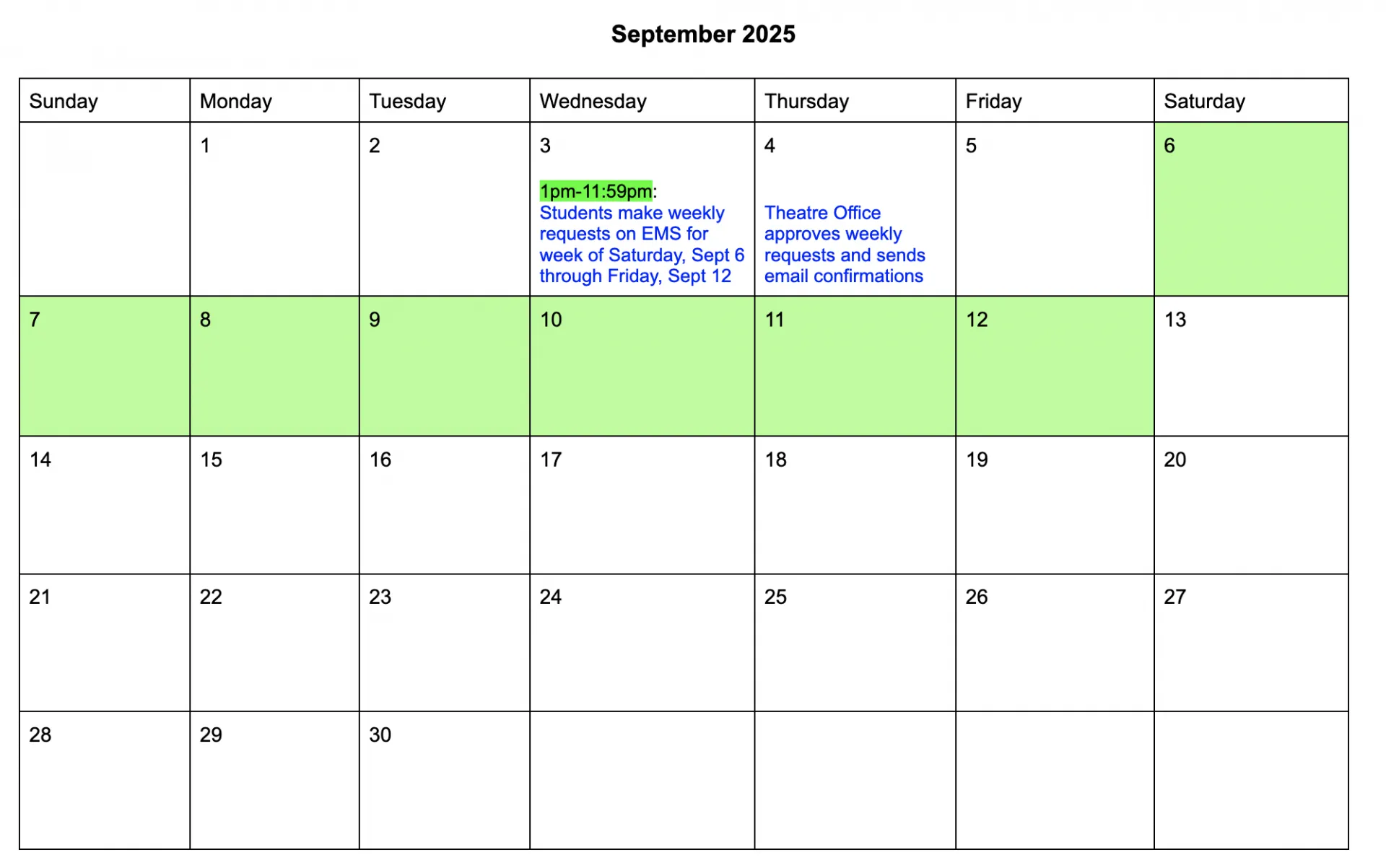
Weekly requests are based on a Saturday-Friday week. These requests can only be made during the reservation window, which is between 1pm-11:59pm on the Wednesday prior to the start of the reservation week.
Any attempt to book a space early (before the designated start time of 1pm on Wednesdays) will result in your reservation being deleted.
All weekly reservations are reviewed on Thursday for the following week (Saturday-Friday) - please see the below graphic.
The order in which requests are submitted during the reservation window is taken into account when requests of the same priority level are submitted for the same time.
Last Minute Request
Last minute requests are contingent upon what is available after weekly requests are filled, so it is always better to plan ahead and make a weekly request.
The Theatre Program reserves the right to change or cancel a confirmed reservation. Space is only approved during business hours, Mon-Fri 9-5PM EST. If you need a last minute reservation over the weekend, you will need to make the request by 4pm on Friday.
Space Request - How-to
Click here to login and put in your space request. Click on “My Account” and then go to either “Log In” or “Create an Account”.
Affiliation is "Theatre Students"
In the “Event Name” space, enter:
- First Name
- Last Name
- (UNI) of primary student
- Production Code/Course Number
- If a space request is non-curricular, the code is “NONC”
- Example: “William Shakespeare (WS1234) - 2YMAT2”
IMPORTANT: If you leave out any of these details, we will reject your reservation and request you to re-submit it with all the correct information added.
- Once space requests have been approved, a confirmation email will be sent from the Theatre Office ([email protected]). Students can also log into their accounts, click on “My Requests”, and see all approved or changed reservations.
- If you wish to follow up to the Theatre Office confirmation, email [email protected] (not [email protected], as we do not receive replies to that email).
To Edit an Existing Reservation
Either delete the reservation and submit a new booking request, or [email protected] to request a change be made on your behalf.
Things to Keep in Mind
- The end of your booking time is when you vacate the space. Please return the space to its neutral setting (graphics can be found on the wall of every room.)
- Duplicate bookings will be automatically deleted. Please do not book multiple spaces at the same time in an attempt to prioritize your request(s).
- If the room is no longer needed, we expect students to cancel the reservation within EMS right away, so someone else can use the space.
Hours of Operation & Access Information
Dodge Hall
8AM-10PM
Dodge 603 Room Code: 1, 2, 4
Dodge 605 Room Code: 2, 4, 5
Schapiro
Monday-Friday: 6PM-11PM
Saturday & Sunday: 10AM-11PM
Please email [email protected] to make reservations in Schapiro, as all requests must be approved by Tom Gilmore prior to confirmation.
Riverside Church
Monday-Saturday:
12T & 15T: 8AM-11PM
13T: 6PM-11PM
Sundays: 6PM-11PM (12T, 13T, and 15T)
Nash
10AM-9:45PM
NOTE: Non-Academic Hours of Operation schedules will be communicated by email closer to the date (ex: Winter Break, Spring Recess, etc.) Schapiro and Nash are closed on University/Academic Holidays (ex: Labor Day, Election Day).
Rules for All Rehearsal Rooms
CUID must be carried at all times.
All COVID Protocols (University-wide and Production) must be followed in all Columbia spaces.
No food or drink is allowed; bottled water only.
No smoking.
No open flame of any kind.
Restore room to neutral when finished.
Turn off all lights and close the door when finished with the space.
If you are the Columbia representative for a non-curricular (NONC) booking, you must be present for the duration of the booking.